How do I create price list and start receiving orders?
How do I create price list and start receiving orders?
If you don't have any offers, the system will automatically direct you to the Create price list page after signing up.
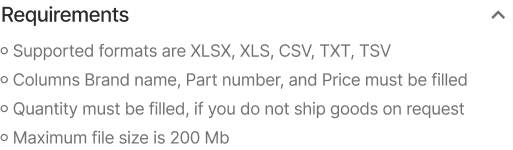
Fill in the required fields and upload a file with the offer in one of the following formats: XLSX, XLS, CSV, TXT, TSV. Maximum file size is 200Mb
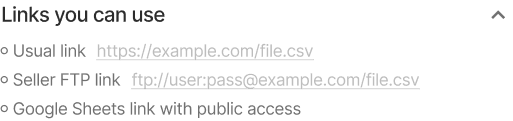
You can also upload the file via a link: usual link, seller FTP or Google Sheets.
If you already have an offer, click the "Create price list" button in the "Products" section.
Fill in the required fields and upload a file with the offer in one of the following formats: Excel, CSV, TXT.
You can also upload the file via a link (direct or Google Sheets), send to email or upload to a dedicated FTP account.
Configure the offer parameters: title, currency, availability type, activity, VAT settings (if applicable), tax number, shipping schedule and weekends.
Once your listing is active, products will appear for sale on emexdwc.ae and emex.ru in 30 min.
If you don't have any offers, the system will automatically direct you to the Create price list page after signing up.
Fill in the required fields and upload a file with the offer in one of the following formats: XLSX, XLS, CSV, TXT, TSV. Maximum file size is 200Mb
You can also upload the file via a link: usual link, seller FTP or Google Sheets.
If you already have an offer, click the "Create price list" button in the "Products" section.
Fill in the required fields and upload a file with the offer in one of the following formats: Excel, CSV, TXT.
You can also upload the file via a link (direct or Google Sheets), send to email or upload to a dedicated FTP account.
Configure the offer parameters: title, currency, availability type, activity, VAT settings (if applicable), tax number, shipping schedule and weekends.
Once your listing is active, products will appear for sale on emexdwc.ae and emex.ru in 30 min.